Dein Leitfaden für das perfekte Video-Podcast-Setup mit zwei Mikrofonen
Einen Video-Podcast mit Co-Host oder Gast zu starten, kann wie eine große technische Herausforderung wirken. Mehrere Mikrofone, Kameras und Software gleichzeitig zu bedienen, kann schnell kompliziert werden – und viele Creator dazu bringen, ihre Projekte aufzuschieben oder ganz aufzugeben. Doch ein professionelles, sendetaugliches Podcast-Setup für zwei Personen ist einfacher, als du vielleicht denkst. Mit dem richtigen Ansatz und einer übersichtlichen Ausstattung kannst du überzeugende Inhalte erstellen, die sowohl fantastisch aussehen als auch klingen.
Dieser Leitfaden zeigt dir, wie du mit dem RØDECaster Video S ein leistungsstarkes und dennoch minimalistisches Video-Podcast-Setup mit zwei Mikrofonen aufbaust. Wir behandeln alles – von der unverzichtbaren Ausstattung bis hin zu einem reibungslosen Aufnahme-Workflow – und zeigen, wie RØDEs umfangreiches Angebot an kreativen Lösungen den gesamten Prozess vereinfachen kann.
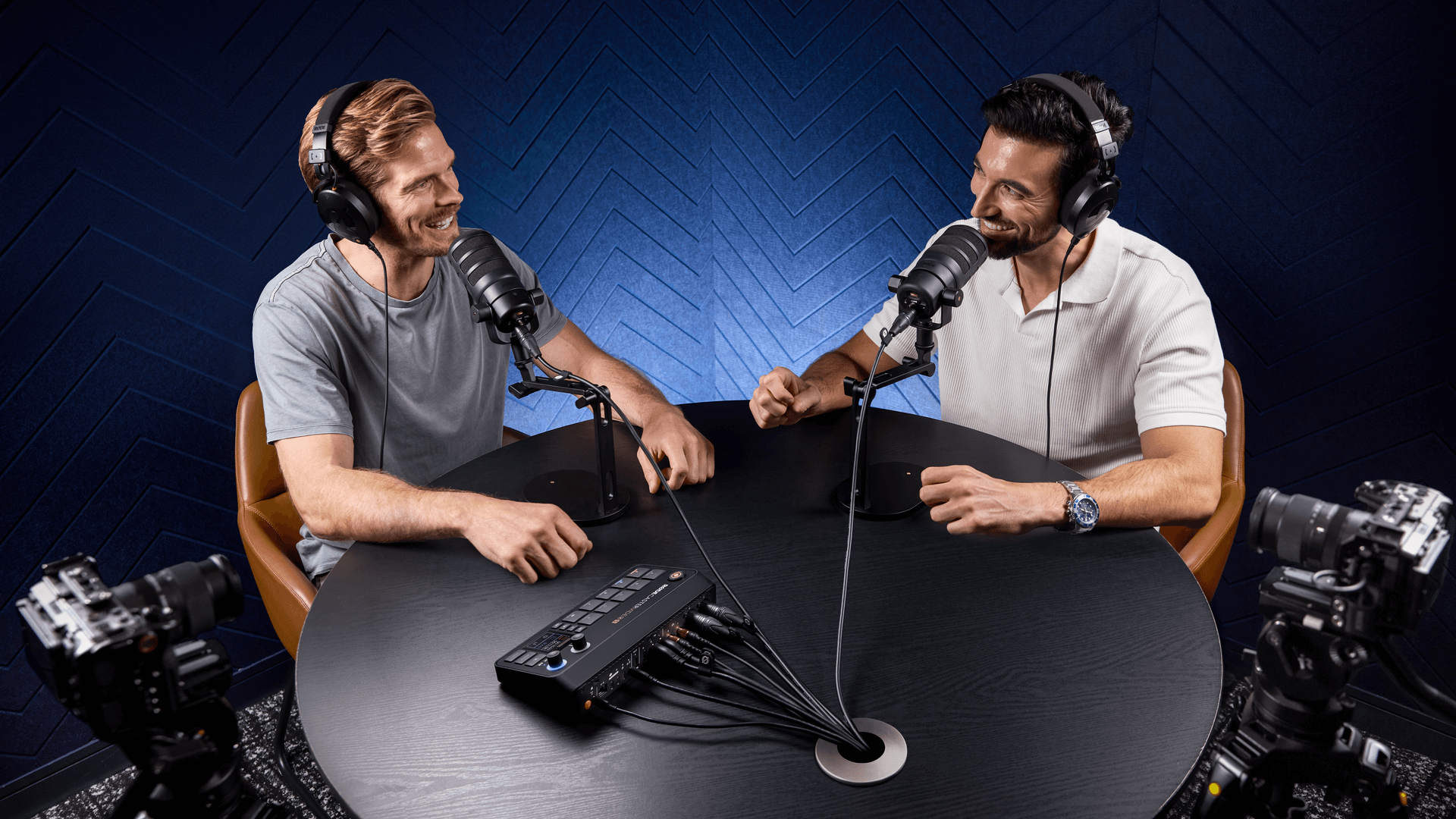
Schritt 1: Mikrofone einrichten und mit RØDECaster Video S verbinden
Die Grundlage jedes großartigen Podcasts ist sauberer, konsistenter Klang. Für ein Format mit zwei Personen benötigen Sie Mikrofone, die Klarheit, Wärme und einen authentischen Broadcast-Klang liefern. RØDECaster Video S gibt Ihnen dank seiner beiden professionellen Neutrik®-Kombibuchsen mit XLR-Eingängen und eines flexiblen USB-C-Eingangs, der eine große Auswahl an RØDE USB Mikrofonen unterstützt, völlige Freiheit bei der Wahl des passenden Mikrofons für jeden Host.
Wenn Sie traditionelle Broadcast-Mikrofone bevorzugen, ist das PodMic eine zuverlässige XLR-Option mit einem fokussierten, druckvollen Klang. Das PodMic USB bietet sowohl XLR- als auch USB Konnektivität und lässt Ihnen Raum, Ihr Setup zu erweitern oder anzupassen. Für Creator, die einen einfachen digitalen Workflow wünschen, wird das NT-USB+ direkt über USB-C angeschlossen und bietet eine fortschrittliche digitale Signalverarbeitung (DSP).
Sobald Sie Ihre Mikrofone ausgewählt haben, schließen Sie sie über den XLR- oder USB-C-Eingang direkt an RØDECaster Video S an. Zusätzliche Adapter oder externe Interfaces sind nicht erforderlich. Die Konsole verfügt über integrierte, rauscharm arbeitende Revolution-Preamps mit hoher Verstärkung sowie APHEX®-Audioeffekte in Studioqualität, die dafür sorgen, dass beide Stimmen vom ersten Moment der Aufnahme an ausgewogen und professionell klingen.
Schritt 2: Kameras einrichten und verbinden
Bei einem Video-Podcast sind die visuellen Inhalte genauso wichtig wie der Ton. Ein Podcast mit zwei Personen profitiert von mindestens zwei Kameraperspektiven:
- Eine Totale, die beide Hosts zeigt
- Eine Nahaufnahme für jede sprechende Person
Positionieren Sie Ihre Kameras auf Augenhöhe, um eine möglichst natürliche Darstellung zu erzielen, und achten Sie auf eine gleichmäßige Ausleuchtung beider Hosts. Sobald Sie Ihre Kameras optimal positioniert haben, lässt sich Ihr Video mit dem RØDECaster Video S nahtlos mit Ihrem Ton verbinden. Schließen Sie Ihre Videokameras (DSLR, spiegellose Kameras oder Webcams) über einen der drei HDMI-Eingänge oder den USB 4-Anschluss an das RØDECaster Video S an. Der integrierte Videoswitcher unterstützt Multi-Cam-Produktionen und ermöglicht es Ihnen, Perspektiven mühelos umzuschalten oder Split-Screen-Aufnahmen direkt über den Touchscreen zu erstellen.
Während hochwertige spiegellose Kameras und DSLRs eine hervorragende Grundlage bilden, unterstützt das RØDECaster Video S auch NDI®, wodurch flexible netzwerkbasierte Workflows möglich werden. Mit NDI können Sie Video in Broadcast-Qualität über eine standardmäßige Netzwerkverbindung übertragen. So können Sie Kameras frei positionieren, ohne lange Kabelwege oder eine komplizierte Signalführung.
Ein besonders leistungsstarkes Beispiel ist die Verwendung der RØDE Capture-App, um Ihr iPhone in eine kabellose Kamera mit mehreren Perspektiven zu verwandeln. Sie können die Front- und Rückkamera gleichzeitig übertragen und sauberes Video mit geringer Latenz direkt über Ihr Netzwerk an das RØDECaster Video S senden. So erweitern Sie Ihre Perspektiven äußerst flexibel und halten Ihr Setup übersichtlich.
Schritt 3: Passen Sie Ihre Aufnahme- und Monitoring-Erfahrung individuell an
Mit dem RØDECaster Video S haben Sie die vollständige Kontrolle – ganz ohne Komplexität. Stellen Sie mit dem reaktionsschnellen Drehregler die Audiopegel ein, aktivieren Sie intelligente Funktionen wie Noise Gates und Kompressoren und lösen Sie über die programmierbaren Pads Soundeffekte oder Stinger aus.
Das RØDECaster Video S unterstützt Mehrspuraufnahmen für Video und Audio und bietet Ihnen dadurch maximale Flexibilität in der Postproduktion. Sie können Ihren gemischten Programmausgang ausgeben oder einzelne Spuren für die weiterführende Bearbeitung exportieren – und haben so die volle Kontrolle wie ein Produzent.
Mit der RØDECaster App können Sie Ihre Produktion außerdem vollständig drahtlos steuern: Eingänge umschalten, Audio anpassen, Szenen erstellen und alles in Echtzeit von Ihrem Computer aus überwachen.
Schritt 4: Nahtlos live gehen oder aufnehmen
Jetzt, da alles eingerichtet ist, können Sie Ihre Inhalte teilen! RØDECaster Video S wurde sowohl für Livestreaming als auch für Aufnahmen entwickelt. Senden Sie Ihren fertigen Mix mit nur einem Fingertipp direkt an die Plattform Ihrer Wahl (YouTube, Twitch, Facebook Live, Zoom und mehr). Die integrierten Ausgänge und der dedizierte Mix-Minus machen die Einbindung von Gästen aus der Ferne zum Kinderspiel und sorgen dafür, dass jeder Workflow mit Podcast-Mikrofonen und Kameras professionell und stressfrei wirkt.
Alternativ können Sie direkt auf einem externen USB Speichergerät aufnehmen – für Langformate oder Sitzungen mit mehreren Episoden und mit reichlich Speicherplatz, ohne auf einen Computer angewiesen zu sein. Der RØDECaster Video S nimmt intern hochwertiges Audio und Video von mehreren Kameras auf und stellt sicher, dass Ihre Dateien perfekt synchron bleiben und frei von Aussetzern sind. Außerdem können Sie Mehrspur-Audioaufnahmen und isolierte Kamerasignale nutzen, wodurch Sie bei der Nachbearbeitung die volle Kontrolle behalten. Dank der integrierten automatischen Dateiorganisation und Echtzeitüberwachung wird jede Sitzung sauber aufgezeichnet und ist direkt nach dem Abschluss für einen reibungslosen Schnitt bereit.
Checkliste für die wichtigste Ausrüstung für Video-Podcasts
Mit diesen unverzichtbaren Komponenten, die alle nahtlos mit dem RØDECaster Video zusammenarbeiten, lässt sich dein Studio ganz einfach einrichten:
- RØDECaster Video S: Die zentrale Steuereinheit deines Setups, die sämtliche Audio- und Video-Ein- und -Ausgänge, das Umschalten, die Signalverarbeitung und die Aufnahme verwaltet.
- Mikrofone (x2): RØDE PodMic, PodMic USB oder NT USB+ Mikrofone harmonieren hervorragend mit den professionellen Vorverstärkern des RØDECaster Video S.
- Kopfhörer (x2): Die Studiokopfhörer NTH-100 bieten eine präzise Kontrolle und hohen Komfort bei langen Sessions – unverzichtbar beim Aufnehmen und Bearbeiten von Audio auf dem RØDECaster Video S. Für eine kompaktere und leichtere Passform empfiehlt sich der On-Ear-Kopfhörer NTH-50.
- Stative/Galgenarme (x2): Der professionelle Studioarm PSA1+ oder der Tischständer DS2 ermöglicht eine stabile, leicht anpassbare Mikrofonpositionierung für jede sprechende Person.
- Kameras (x2 oder mehr): Verwende spiegellose Kameras, DSLRs oder hochwertige Webcams mit HDMI-Ausgang zur direkten Integration in das RØDECaster Video S.
- Beleuchtung: LED-Panels oder ein einfaches Drei-Punkt-Beleuchtungsset sorgen für ein klares, professionelles Erscheinungsbild vor der Kamera.
- Speicher: Nimm für längere Sessions direkt auf einem externen USB Speichergerät auf oder streame direkt auf alle wichtigen Plattformen.
RØDECaster Video S: Die ultimative Lösung für Video-Podcast-Creator
Wie Sie sehen, muss die Produktion eines hochwertigen Podcasts für zwei Personen weder kompliziert noch einschüchternd sein. Mit dem RØDECaster Video S haben Sie einen All-in-One-Produktionspartner an Ihrer Seite, der für Creator entwickelt wurde und jeden Schritt Ihres Video-Podcast-Setups mit zwei Mikrofonen optimiert.
Mit branchenführenden Funktionen, intelligenter Automatisierung und kompromissloser Audio- und Videointegration ist der RØDECaster Video S die Wahl für Creator, die Ergebnisse auf Weltklasseniveau ohne unnötigen Aufwand erzielen möchten. .
Bereit für die Aufnahme? Entdecken Sie hier, wie der RØDECaster Video S den Standard für Podcast-Setups mit zwei Personen neu definiert.