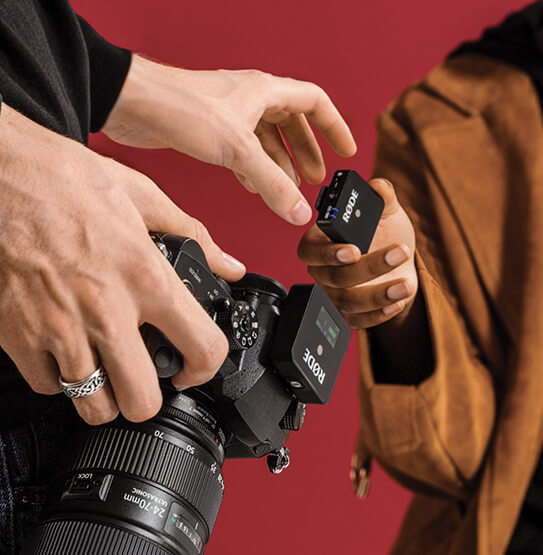
Wireless GO
컴팩트 무선 마이크 시스템
Wireless GO 는 클립앤고(clip’n’go)의 뛰어난 활용성과 놀라울 정도로 컴팩트한 폼팩터가 돋보이는 초소형 무선 마이크 시스템입니다. 송신기에는 무지향성 콘덴서 캡슐이 내장되어 있어 클립온 마이크로 사용하거나 RØDE 라발리에와 함께 사용할 수 있으며, 2.4GHz 디지털 전송을 통해 방송급의 선명한 오디오를 카메라 장착형 수신기로 전송합니다. 영화 제작자, 카메라 앞 진행자, 취재 기자, 브이로거 등 모든 분야의 콘텐츠 제작자를 위한 완벽한 무선 마이크 솔루션입니다.
- Transmitter 클립형 마이크 또는 라발리에/헤드셋 마이크용 벨트팩으로 작동
- 초소형 폼팩터 – 송신기와 수신기의 무게가 각각 불과 31g
- 128비트 암호화를 지원하는 Series III 2.4GHz 디지털 무선 전송으로 어떤 환경에서도 매우 선명한 오디오를 제공하며, Wi-Fi와 Bluetooth 신호가 밀집된 환경(쇼핑몰, 컨벤션, 호텔 등)에서도 뛰어난 성능 발휘
- 최대 70m의 전송 거리(가시선 기준), RF 환경이 혼잡한 곳에서 단거리 작동에 최적화
- 최대 7시간 지속되는 내장 충전식 배터리, USB-C로 충전
- 매우 간편한 사용 – 송신기와 수신기가 3초 이내에 자동 페어링
- 3단계 출력 패드(0dB, -12dB 및 -24dB)와 배터리 절약 모드
- 한 장소에서 최대 8개 시스템 사용 가능
- 블랙 또는 화이트 색상으로 제공
- 호주 시드니에 위치한 RØDE의 정밀 제조 시설에서 설계 및 생산
Wireless GO 는 클립앤고(clip’n’go)의 뛰어난 활용성과 놀라울 정도로 컴팩트한 폼팩터가 돋보이는 초소형 무선 마이크 시스템입니다. 송신기에는 무지향성 콘덴서 캡슐이 내장되어 있어 클립온 마이크로 사용하거나 RØDE 라발리에와 함께 사용할 수 있으며, 2.4GHz 디지털 전송을 통해 방송급의 선명한 오디오를 카메라 장착형 수신기로 전송합니다. 영화 제작자, 카메라 앞 진행자, 취재 기자, 브이로거 등 모든 분야의 콘텐츠 제작자를 위한 완벽한 무선 마이크 솔루션입니다.
- Transmitter 클립형 마이크 또는 라발리에/헤드셋 마이크용 벨트팩으로 작동
- 초소형 폼팩터 – 송신기와 수신기의 무게가 각각 불과 31g
- 128비트 암호화를 지원하는 Series III 2.4GHz 디지털 무선 전송으로 어떤 환경에서도 매우 선명한 오디오를 제공하며, Wi-Fi와 Bluetooth 신호가 밀집된 환경(쇼핑몰, 컨벤션, 호텔 등)에서도 뛰어난 성능 발휘
- 최대 70m의 전송 거리(가시선 기준), RF 환경이 혼잡한 곳에서 단거리 작동에 최적화
- 최대 7시간 지속되는 내장 충전식 배터리, USB-C로 충전
- 매우 간편한 사용 – 송신기와 수신기가 3초 이내에 자동 페어링
- 3단계 출력 패드(0dB, -12dB 및 -24dB)와 배터리 절약 모드
- 한 장소에서 최대 8개 시스템 사용 가능
- 블랙 또는 화이트 색상으로 제공
- 호주 시드니에 위치한 RØDE의 정밀 제조 시설에서 설계 및 생산
작은 패키지. 뛰어난 결과
Wireless GO 시스템은 ‘초소형 무선 마이크’의 정수를 보여줍니다. 송신기(TX)와 수신기(RX)의 무게는 각각 단 31g에 불과합니다. TX 는 눈에 띄지 않게 클립으로 고정해 사용하는 마이크로 활용하거나, RØDE 라발리에 마이크를 위한 세계에서 가장 작은 벨트팩으로 사용할 수 있어 콘텐츠 제작, 영화 제작, 온카메라 또는 무대 프레젠테이션, 브이로그, 유튜브 콘텐츠 제작, 라이브 스트리밍 등에 완벽합니다.
프로페셔널 사운드. 간편한 사용
Wireless GO 시스템은 3초 이내에 자동으로 페어링되며, RØDE의 Series III 디지털 2.4GHz 전송 방식을 통해 신호를 전송합니다. 이 방식은 RF 및 Wi-Fi 환경이 혼잡한 곳에서 단거리 운용에 최적화되어 있으며, 최대 70m의 인상적인 가시선 전송 거리도 제공합니다. 카메라 또는 녹음 장치에 맞춰 출력 레벨을 정밀하게 조정할 수 있는 3단계 게인 컨트롤과 편리한 배터리 절약 모드도 갖추고 있습니다. 내장 리튬 이온 배터리는 최대 7시간 동안 사용할 수 있으며 USB-C로 충전합니다.
런앤건 촬영을 위한 올인원 솔루션
TX 에는 방송급 오디오를 제공하는 내장 무지향성 콘덴서 마이크가 탑재되어 있으며, 3.5mm TRS 입력을 통해 모든 라발리에 마이크와 함께 사용할 수도 있습니다. RX에는 두 가지 방식으로 사용할 수 있는 클립이 있어 의류나 카메라 스트랩에 고정하거나 카메라의 콜드 슈에 안정적으로 밀어 넣을 수 있습니다. 초소형, 초경량에 놀라운 다재다능함까지 갖췄습니다.