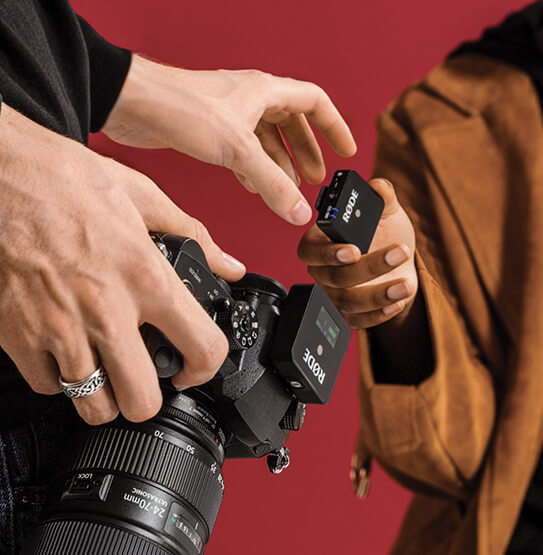
Wireless GO
紧凑型无线麦克风系统
Wireless GO 是一款超紧凑型无线麦克风系统,凭借灵活便捷的夹扣式使用方式和极其小巧的外形设计而独具一格。发射器内置全向电容式拾音头,既可作为夹式麦克风使用,也可搭配RØDE 领夹式麦克风,通过2.4GHz数字传输将清晰透彻、达到广播级标准的音频发送至机载接收器。对于各领域的内容创作者而言,它是理想的无线麦克风解决方案:电影制作人、出镜主持人、新闻采集人员、视频博主等。
- Transmitter 可作为夹式麦克风使用,也可作为领夹式/头戴式麦克风的腰包发射器
- 超紧凑机身设计——发射器和接收器每个仅重31克
- Series III 2.4GHz数字无线传输搭配128位加密,无论何种环境都能提供清晰透彻的音频,并且在密集的Wi-Fi和Bluetooth环境中(购物中心、会议、酒店等)表现出色
- 传输距离最远可达70米(视距),针对射频环境拥挤时的短距离操作进行了优化。
- 内置可充电电池,续航时间最长可达7小时,并通过USB-C充电
- 极易使用——发射器和接收器可在三秒内自动配对
- 三档输出衰减(0dB、-12dB 和-24dB)及省电模式
- 同一地点最多可同时使用八套系统
- 提供黑色或白色版本
- 在澳大利亚悉尼RØDE精密制造工厂设计并制造
Wireless GO 是一款超紧凑型无线麦克风系统,凭借灵活便捷的夹扣式使用方式和极其小巧的外形设计而独具一格。发射器内置全向电容式拾音头,既可作为夹式麦克风使用,也可搭配RØDE 领夹式麦克风,通过2.4GHz数字传输将清晰透彻、达到广播级标准的音频发送至机载接收器。对于各领域的内容创作者而言,它是理想的无线麦克风解决方案:电影制作人、出镜主持人、新闻采集人员、视频博主等。
- Transmitter 可作为夹式麦克风使用,也可作为领夹式/头戴式麦克风的腰包发射器
- 超紧凑机身设计——发射器和接收器每个仅重31克
- Series III 2.4GHz数字无线传输搭配128位加密,无论何种环境都能提供清晰透彻的音频,并且在密集的Wi-Fi和Bluetooth环境中(购物中心、会议、酒店等)表现出色
- 传输距离最远可达70米(视距),针对射频环境拥挤时的短距离操作进行了优化。
- 内置可充电电池,续航时间最长可达7小时,并通过USB-C充电
- 极易使用——发射器和接收器可在三秒内自动配对
- 三档输出衰减(0dB、-12dB 和-24dB)及省电模式
- 同一地点最多可同时使用八套系统
- 提供黑色或白色版本
- 在澳大利亚悉尼RØDE精密制造工厂设计并制造
小巧机身,出色表现
Wireless GO 系统堪称“迷你无线麦克风”的典范。发射器(TX)和接收器(RX)每个仅重31克。TX 既可作为隐蔽的夹式麦克风使用,也可作为全球最小巧的腰包发射器,搭配RØDE 领夹式麦克风使用——非常适合内容创作、电影制作、镜头前或舞台演讲、视频博客、YouTube视频、直播等场景。
专业音质,轻松易用
Wireless GO 系统可在三秒内自动配对,并通过RØDE Series III数字2.4GHz传输技术进行传输。该技术针对高密度射频和Wi-Fi环境下的短距离使用进行了优化,同时还提供令人印象深刻的70米视距传输范围。系统配备三级增益控制,可精准匹配相机或录音设备的输出电平,并提供便捷的省电模式。内置锂离子电池续航最长可达7小时,并通过USB-C充电。
一体化设计,专为快速拍摄而生
TX 内置全向电容麦克风,可提供广播级音频表现;通过3.5mm TRS输入,还可搭配任何领夹式麦克风使用。RX配备双用途夹具,既可夹在衣物或相机背带上,也可稳固地滑入相机的冷靴座。超紧凑、超轻量,功能极其灵活。